Assign page templates
Signal ships eight page layouts beyond the plain one. A lookbook, a stockist list, a size guide, an FAQ — each is a complete design waiting for a page to attach to.
The step people miss: creating the page doesn’t apply the layout. A new page gets the default template and looks empty until you point it at the right one.
Do this
Section titled “Do this”-
Create the page.
Shopify admin → Online Store → Pages → Add page. Give it a title. You can leave the content box empty — most of these layouts build themselves from section settings, not from the content field.
-
Find the Template dropdown.
Right-hand sidebar, below Visibility.
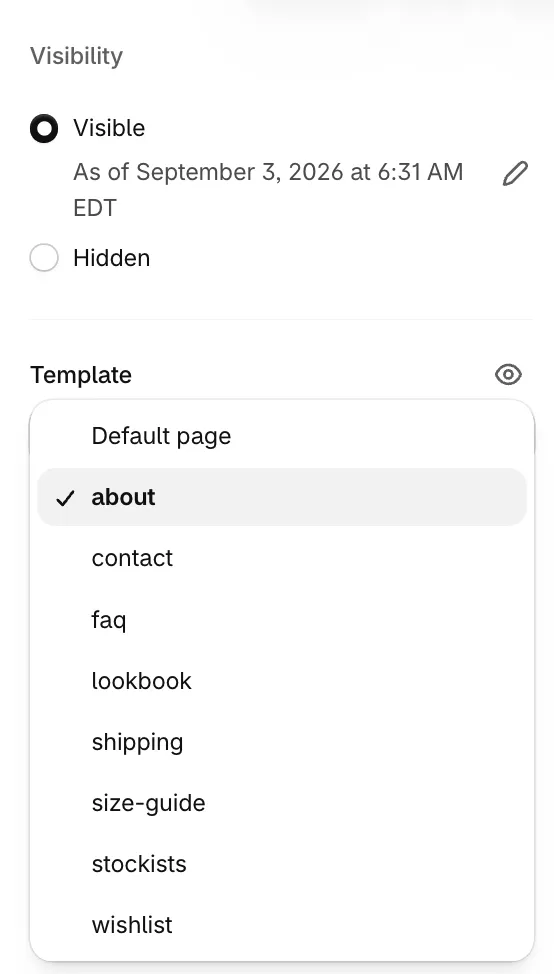
Eight layouts plus the default. The ticked one is active. -
Pick the template that matches.
Template For aboutBrand story — masthead, founder note, timeline contactContact form with details alongside faqGrouped, collapsible questions lookbookEditorial imagery with shoppable hotspots shippingDelivery and returns policy size-guideMeasurement tables stockistsPhysical retail locations wishlistWhere saved items appear — required if you use the wishlist -
Save.
-
Open the page in the theme editor to fill it in.
Theme editor → template dropdown at the top → Pages → your template. The sections are already in place with demo content; replace it with yours.
If it looks wrong
Section titled “If it looks wrong”The page is blank. It’s still on Default page. Check the dropdown actually saved — it’s easy to pick and then navigate away without saving.
The layout appeared but it’s empty. The template is applied; the sections need content. Open it in the theme editor rather than the admin page editor.
My page content vanished. It didn’t — most of these layouts don’t render the content field, because they build from sections instead. Your text is still there. Either move it into a section, or use Default page.
The template isn’t in the list. Templates come from the theme, so check you’re previewing Signal and not another theme.
- Pages and templates reference — what each template builds, section by section
- Wishlist — how saving works and where items live
- Navigation — getting these pages into your menus